
Today’s accounting or bookkeeping firms face challenges like never before. Firms face immense pressure to handle taxes, adhere to compliance regulations, process payroll, report to clients, and deliver advisory services. The time and accuracy constraints increase pressure even more.
Outdated practices like manual processes, endless spreadsheets, email follow-ups, and repetitive data entry are unmanageable.
This is where workflow automation comes in.
With workflow automation, accounting and bookkeeping firms can streamline processes, reduce errors, work more efficiently, and improve productivity. They can improve their processes and scale their firm without increasing overhead.
This guide will provide a detailed process for workflow automation to USA Accounting Firms to improve their processes.
What is Workflow Automation in Accounting?
Automation of workflows in accounting means applying technologies to streamline repetitive processes, including approvals, notifications, document processing, and financial operations.
Think of what you’d do.
Manually
- Send reminders for invoices.
- Assign tasks for bookkeeping.
- Track deadlines for taxes.
- Follow up with clients on documents.
- Enter data from receipts.
Automation systems take over these tasks, with little human intervention, by making decisions based on predefined criteria.
- For instance, if a customer uploads a document, the system will notify the designated accountant.
- When invoices are due, the system sends reminders to the appropriate personnel.
- When payroll is processed, reports are automatically generated and sent to specified email addresses.
Automation ensures a predictable workflow, with little chance of errors.
Why USA Accounting & Bookkeeping Firms Must Automate
Changes in the accounting profession have been dramatic over the last number of years. Firms that do not employ some level of automation will be surpassed.
There are several overriding factors that compel automation at this time:
1. Client Expectations
The situations described in the previous methodology section indicate that communication and reporting increase through automation and reporting speeds up and streamlines through automation.
2. Compliance and Regulations
In the reporting of tax information, automation is likely to be the most efficient method, as it will increase accuracy. Manual processes are likely to be less compliant with regulations.
3. Shortage of Trained Professionals
It is possible that automation will allow accounting firms to do more with less, provided that resources are limited.
4. Scalability
As firms expand and the volume of clients increases, the volume of clients will increase and the level of consistency will be the same.
5. Hybrid Work Environments
Many accounting firms have automation. Automation enhances hybrid working environments.
In conclusion, automation is a critical accounting practice as it increases efficiency, revenue, and customer satisfaction.
Step-by-Step Implementation Guide
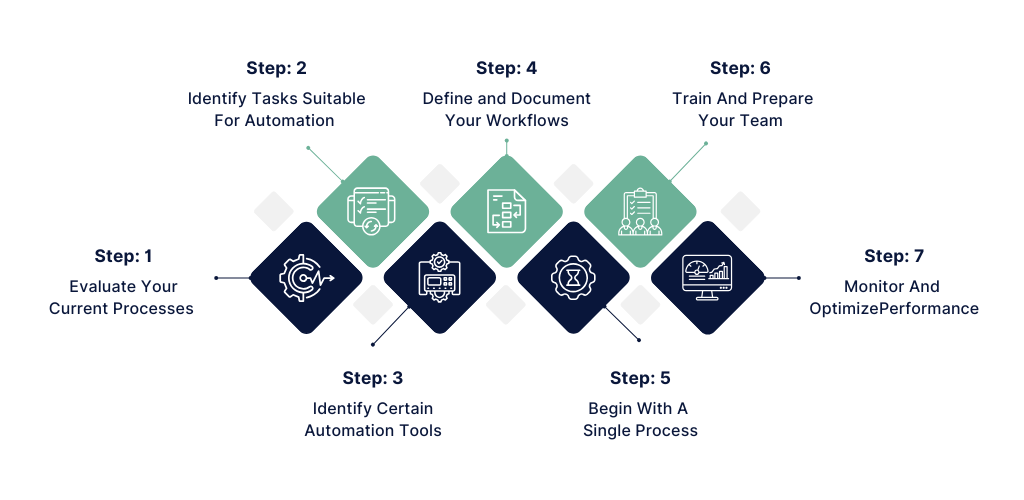
Here’s how USA Accounting and Bookkeeping firms can implement workflow automation successfully:
Step 1: Evaluate Your Current Processes
- Begin with workflow mapping covering:
- Client Onboarding
- Monthly Bookkeeping
- Accounts Payable/Receivable
- Payroll
- Taxes
- Reports
Highlight inefficiencies with a focus on bottlenecks, repeated tasks, and error-prone areas.
Step 2: Identify Tasks Suitable for Automation
Not all tasks should be automated. Prioritize:
- Data entry
- Invoice creation
- Payment reminders
- Document retrieval
- Assignment of tasks
- Approval processes
- Reporting (recurring)
Repetitive and rule-based tasks are ideal candidates.
Step 3: Identify Certain Automation Tools
Choose the tools that can integrate with your current accounting packages (like QuickBooks or Xero).
Consider these factors:
- Cloud-based solutions
- CRM attachment
- Automated reminders
- Workflow visualization tools
- Electronic document organizing
- Data protection
The right tools will guarantee successful process implementations.
Step 4: Define and Document Your Workflows
In order to successfully automate your work, create processes that have been made uniform and simplify the process:
- Define who does what.
- Create lists of who must approve what.
- Determine how to name documents.
- Create systems to track deadlines.
Automation is most effective when systems are organized.
Step 5: Begin with a single process.
It is advisable to not automate all processes at the same time.
It is a good idea to begin with a single process, for example,
- reminders for invoices
- onboarding of new clients
- monthly bookkeeping
- Test, adjust, and then scale.
Step 6: Train and Prepare Your Team
When your team understands the process, the chances for successful automation are high.
It is possible to organize training for employees.
- Provide documentation of each step of the new process.
- Identify people who will be responsible for process automation.
- Ensure that all employees use the new process.
Step 7: Monitor and Optimize Performance
When measuring results, track the following:
- Time saved
- Error reduction
- Client turnaround time
- Revenue growth
Optimize your process for maximum results.
Common Mistakes to Avoid
Even effective automation methods can go wrong because of the following mistakes:
1. Processes That Are Broken Are Automated.
First, rectify the workflow, and then automate it.
2. Over-engineering the Implementation
Keep it simple. Simple automations are often more effective than complex ones.
3. Neglecting Data Security
For U.S. companies, data security and compliance with the laws related to finance are a must.
4. Lack of Team Support
Without the team, the success of the automated processes is doomed.
5. No Monitoring
In order to generate a return on investment, automation must be monitored.
Benefits of Workflow Automation for US Firms
When done properly, workflow automation provides significant benefits, including:
1. Increased Productivity
More time can be spent on advisory services as less time will be spent on repetitive tasks.
2. Reduced Errors
Fewer mistakes will be made during manual data entry.
3. Faster Turnaround
Tasks can be done without manual follow-ups.
4. Better Client Experience
Clients will be able to receive reports and updates.
5. Improved Profit Margins
Lower operational costs and a higher profitability will be achieved.
6. Scalability
Automation provides the ability to take on more clients without proportionally hiring.
Automation is more than just a tech upgrade for USA accounting and bookkeeping firms; it is a growth engine.
Conclusion
The accounting sector in the United States is evolving towards more advanced, technology-based practices.
Streamlined processes coupled with automation have become a necessity in order to remain competitive in the accounting industry.
Through process evaluation, structured automation implementation, team training, and ongoing optimization, firms can achieve elevated levels of efficiency, a reduction in errors, and the ability to scale with confidence.
At KeyCMS Accounting, we believe that automation allows firms to concentrate on more important matters such as strategic advisory, client engagement, and sustainable growth.
The accounting sector is headed towards a future characterized by automation, efficiency, and scalability.
Frequently Asked Questions (FAQs)
1. What accounting tasks can be automated?
Tasks like invoice generation, payment reminders, payroll processing, document collection, task assignment, and reporting can be automated.
2. Is workflow automation expensive for small firms?
Not necessarily. Many cloud-based solutions are affordable and scalable based on firm size.
3. Will automation replace accountants?
No. Automation handles repetitive tasks, allowing accountants to focus on advisory and strategic roles.
4. How long does it take to implement automation?
Depending on complexity, basic automation can be implemented within a few weeks.
5. Is workflow automation secure?
Yes, if you use secure, compliant platforms with proper data encryption and access controls.
6. Can automation integrate with QuickBooks or Xero?
Yes. Most modern automation tools integrate seamlessly with major accounting platforms.
7. How does automation improve client satisfaction?
Faster responses, accurate reporting, automated updates, and fewer errors enhance the client experience.