With how quickly the business world is evolving, small business owners in the USA are having to deal with rapid changes in growth, compliance, and cash flow. Bookkeeping that captures everything is becoming a slowly dying art. Bookkeeping needs to be automated, and that is the Automated Accounting Tools. Automation in accounting allows you to simplify the way you manage your money, remove the errors that occur when you do it manually, and help you see what your financial situation is in real time.
We support small business owners in making their Accounting processes more efficient through the savings of time, improvements in accuracy, and enhanced support for achieving decisions backed by their accounting data at KeyCMS Accounting LLC.
What is Accounting Automation?
A full accounting automation definition is the use of computer software to perform financially-related repetitive tasks that would normally require the completion of manual entries to the accounting system. Such tasks are the recording of transactions, invoicing, reconciliation of accounting records with transactions of the client’s bank account, expense and payment of wages tracking, and the generation of financial reports.
Rather than doing manual entries, automation software links to your bank account, uses OCR technology to scan and capture receipts, and uses smart rules to determine how to categorize receipts and expenses without being monitored by a human.
Why USA Small Businesses Need Accounting Automation
Here’s why automation is no longer optional – it’s essential:
1. Increase in Value
Value is in your time. If you are stuck doing manual Bookkeeping every month, you are leaving money on the table.
2. Better Accuracy
Computers don’t make mistakes; people do. Automated tools don’t make errors because data is inserted correctly.
3. Insights on Demand
Automated financial dashboards show you the most current information on your cash flow, spending, and profits no need to wait for the end-of-month reports.
4. Stress-Free Taxes
If you deal with the IRS, you know how messy things can get. Good automation tools make compliance with the IRS regulations a snap.
Top Accounting Automation Tools for Small Businesses in the USA
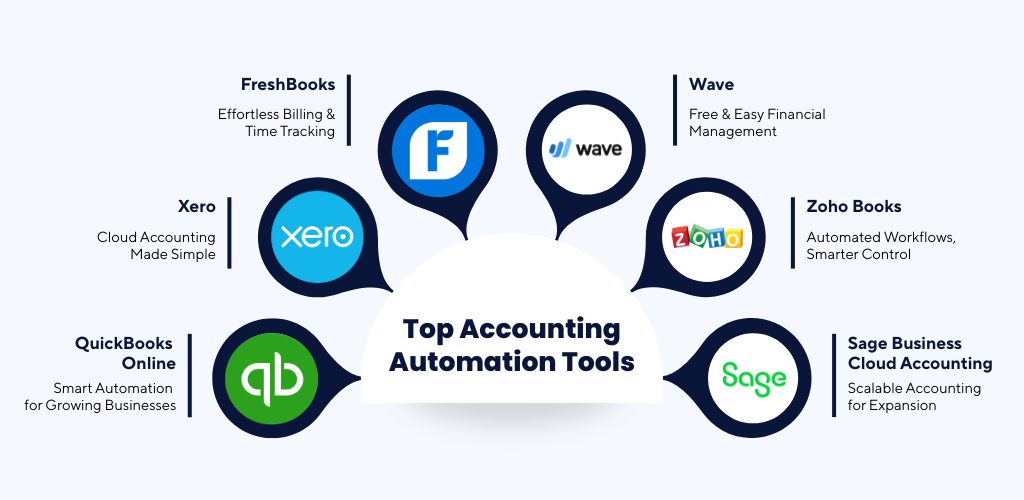
No matter where you are in your entrepreneurial journey, these tools are worth your consideration.
1. QuickBooks Online
Trust QuickBooks to help your small business gain intuitive insights with automated invoicing, bank feeds, Payroll, Taxes, and extensive reporting.
2. Xero
Accounting in the cloud with unparalleled connections to your bank, simple invoicing, and strong other-app connections.
3. FreshBooks
Service-based businesses that want automated billing, timekeeping, and client management, look no further.
4. Wave
At no cost, gain accounting automation for receipts, invoicing, and simple financial reporting. Ideal for freelancers and small businesses.
5. Zoho Books
With a smart assistant, this member of the Zoho family, along with automated workflows and CRM, makes other business app connections.
6. Sage Business Cloud Accounting
With simple automation and many options to grow payroll and inventory, Sage is the ideal choice to integrate and grow.
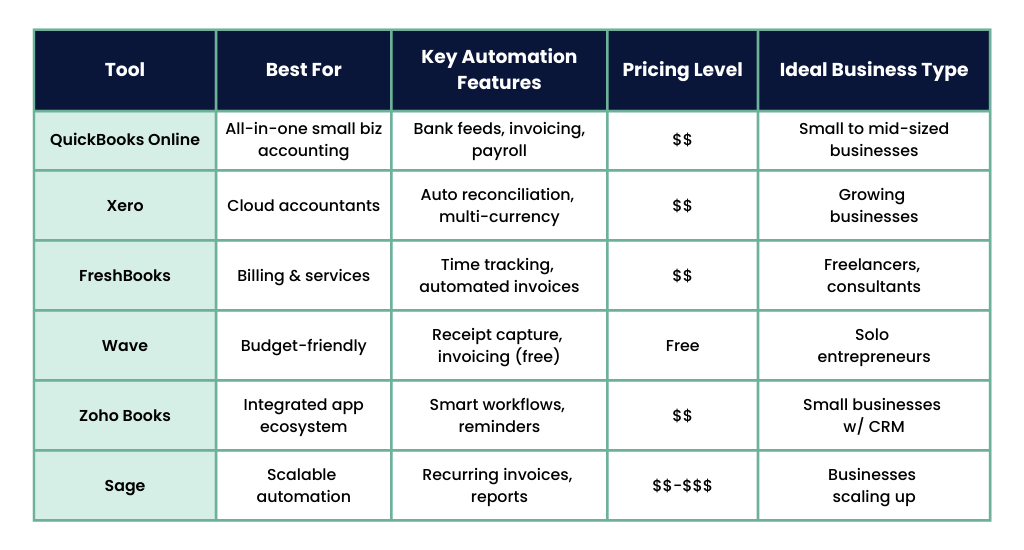
Accounting Automation Tools Comparison
How to Choose the Right Automation Tool
When making a selection, the right tool shouldn’t be based on features but more on the tool’s unique potential. Some things to evaluate are as follows:
- How big is your budget? Are monthly subscriptions manageable?
- What is your business type? Do you require invoicing, payroll, inventory, or perhaps all three?
- How is your business expected to change? Will this tool be able to change with your business?
- What about your other apps? Are you using a CRM or Payroll? Will this tool be compatible with those?
- How about your team? Will this be intuitive for them?
Also, make use of free trials before committing.
Common Mistakes to Avoid
Even the most sophisticated tools can be misused. Here are some mistakes to avoid:
- Not linking all bank accounts results in gaps in financial information.
- Ignoring automation rules stops the system from adapting to your strategy.
- Not taking backups – always protect your financial information.
- Under-training users – tools are only as good as the users.
Why Software Alone Is Not Enough
Your automation tools are not going to replace the need for expertise across the following areas.
- Data Interpretation and Decision Making – Experience in Accounting is needed.
- Business Growth Planning – Automation tools provide the financial data, but the strategy is required.
- Tax, Audit, and Finance Regulatory Knowledge Compliance is a must
Your automation tools are just that: a tool.
Conclusion
Automated accounting solutions have the potential to change the financial operations of small businesses in the United States. The tools may offer time savings, risk mitigation, and insights for improved decision-making. All tools, including QuickBooks Online, Xero, FreshBooks, Wave, Zoho Books, and Sage, support sustainable success when accounting automation is prioritized.
KeyCMS Accounting partners with small business owners to choose, implement, and make the best use of automated accounting solutions so that business owners can concentrate on growth and not on bookkeeping.
FAQs
1. What is accounting automation and how does it work?
Software is used for Accounting Automation and works for other areas like invoicing, tracking expenses, reconciling bank accounts, and payroll. It integrates with your bank account, automatically logging and sorting transactions, and handily does all the data entry work for you.
2. Which accounting automation tool is best for small businesses in the USA?
This best tool depends on your business needs.
- All-in-one accounting is ideal for QuickBooks Online.
- Xero is suitable for growing businesses.
- Service-based businesses do well with FreshBooks.
- Wave is best for freelancers and start-ups.
3. Is accounting automation software secure?
Yes. Accounting tools use bank-level encryption, multi-factor authentication, and secure cloud storage, which is standard for the accounting industry, to keep your financial information secure.
4. Can accounting automation replace an accountant?
No. While automation creates less manual work, an accountant is still needed for financial strategy, tax planning, compliance, and business advisory Services.
5. How much does accounting automation software cost in the USA?
The price is dependent on the individual tools. While some tools like Wave have free plans, other tools like QuickBooks, Xero, and FreshBooks have monthly subscription-based plans that depend on the features and size of the business.
6. What capabilities should accounting automation tools for small businesses have?
Small businesses should look for accounting automation tools that offer features such as automated bank feeds, invoicing, expense categorizations, payroll processing, tax reporting, and real-time reporting. Also important are integrations with CRM and/or e-commerce platforms.
7. What are the best approaches for adopting accounting automation tools for small businesses?
Small businesses adopting accounting automation tools should select automation tools based on their needs, move data with precision, connect all financial accounts, train employees, and collaborate with accounting firms like KeyCMS Accounting for proper configuration and automation.