Keeping track of your finances is very important if you want your business to be successful. If you own a small business, work as a freelancer, or have a mid-sized company, tracking your income, expenses, invoices, and taxes can feel like an impossible task. This is why bookkeeping software can be very useful. Good software can save time, improve cash flow management, and give you insights into your finances, all while reducing errors.
This guide is going to explore more than 10 Bookkeeping Software options. We will highlight important features and give you tips to help you choose the software that fits your business the most.
Why Bookkeeping Software Matters
Keep your business bookkeeping software costs low and your business profits high with bookkeeping software. Its benefits include:
- How to stay accurate: No more making reports, calculating, and messing up. Bookkeeping software does the calculating for you.
- Efficiency: Bookkeeping software does some of the bookkeeping for you. Invoicing. Done. Expense tracking. Done. Payroll. Done.
- Stay compliant: Bookkeeping software keeps your tax and business records for you.
- Quick insight: Bookkeeping software will let you know how much money you have at any given second.
- Scalable: Bookkeeping software will grow with your business. It will always have Bookkeeping Solutions for you.
With these benefits, choosing the right platform becomes a critical decision for business sustainability and growth.
10 Bookkeeping Software Options Worth Considering
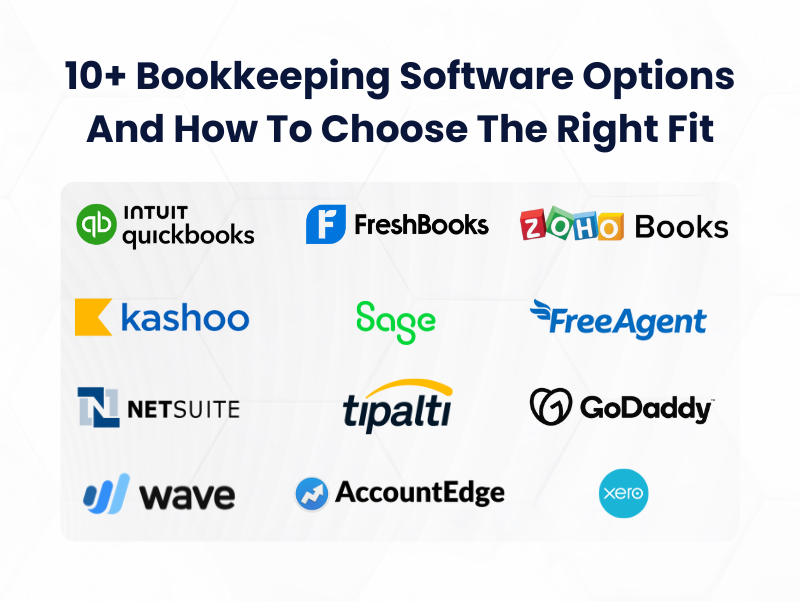
It’s possible to tailor a list by purpose, price, or attributes. Here is a filtered list with 10+ bookkeeping software alternatives:
1. QuickBooks Online
It provides its services to small and mid-market firms, specializing in payroll, invoicing, expenses, and expense reporting. Because of its marketplace integrations, firms searching for a comprehensive solution can consider QuickBooks Online.
2. Xero
Accounting collaboration tools are made easier with Xero cloud-based interface and unlimited user access. More than 1,000 integrations, multi-currency support, and employed inventory management are a few of its notable features.
3. Wave
Wave is ideal for freelancers and solopreneurs, and its bookkeeping, invoicing, and receipt tracking software are sufficient. Alternative features that are available for purchase include payroll and payment tracking; however, these are not necessary.
4. FreshBooks
It targets small service-providing businesses for expense management and invoicing, as well as expense and time tracking. Its bookkeeping is simple enough to accommodate inexperienced users.
5. Zoho Books
It specializes in growing businesses and offers automations, a client portal, and seamless integrations with Zoho’s product line. Global firms appreciate its multi-currency and tax features.
6. Sage 50cloud
Sage 50cloud combines desktop reliability with cloud accessibility. At Sage 50cloud, advanced reporting, controlling costs for jobs, and inventory management make it great for small companies with complex accounting.
7. Kashoo
Kashoo has very basic and uncomplicated software accounting, with a cloud-based solution. It allows simple bank-feed automation, invoicing, and expense management, with a focus on usability and simplicity.
8. AccountEdge Pro
AccountEdge Pro is desktop software with an added cloud option and is great for businesses that want software locally. With advanced inventory management, payroll, and reporting, it has you covered.
9. FreeAgent
FreeAgent is great for small businesses and freelancers. It has expense tracking, invoicing, and time management, and it is even great for those self-employed because of its additional tax functionalities.
10. NetSuite ERP
NetSuite is for companies that are expanding and looking for a high-level enterprise solution. With bookkeeping, inventory, CRM, and reporting modules, it’s great for businesses that are mid- to large-sized and need a financial management system.
11. Tipalti
Tipalti makes bookkeeping easy with its global payment management that caters to businesses that work with numerous currencies, vendors, and compliances.
12. GoDaddy Bookkeeping
GoDaddy targets small business owners and online sellers, providing automated expense management, sales tax reporting, and integration with e-commerce platforms for Amazon, eBay, and Etsy.
Bookkeeping Software Comparison
The following comparison table highlights the Best Bookkeeping Software for small businesses based on features, pricing, and usability.
| Software | Best For | Key Features | Starting Price |
| QuickBooks Online | Small to medium businesses | Invoicing, expense tracking, inventory management, 750+ integrations | ~$30/month |
| Xero | Growing businesses & global companies | Bank reconciliation, multi-currency support, payroll integration | ~$29/month |
| FreshBooks | Freelancers & service businesses | Time tracking, client invoicing, expense management | ~$19/month |
| Zoho Books | Small businesses & startups | Workflow automation, invoicing, inventory, Zoho integrations | Free / ~$15/month |
| Wave Accounting | Solopreneurs & startups | Free invoicing, expense tracking, basic reporting | Free |
| Sage Business Cloud Accounting | Businesses needing compliance & reporting | Cash flow forecasting, tax compliance, reporting tools | ~$10–$25/month |
How do you choose the right bookkeeping software?
Choosing accounting tools that suit your company’s specific needs, budget, and potential for expansion is critical. Consider the following:
1. Business Size and Complexity
- Freelancers/independent business: You can use Wave, FreshBooks, or FreeAgent for your needs.
- Small Companies: You would benefit from QuickBooks Online, Xero, Zoho Books, or Sage 50cloud.
- Mid- and large-sized enterprises: Consider the equivalent of NetSuite or AccountEdge Pro, as the sheer size of your company would require those offerings.
2. Necessary Features
- Basic functions of Accounting, invoicing, expense monitoring, and reconciliation do the job.
- Managing payroll? QuickBooks and Xero would be your integrated payroll solutions!
- Need to track inventory? Sage 50cloud is great, and Xero does inventory quite well.
- Look for add-ons for tax FPS. Software that handles tax filing and reporting might help add compliance to your business.
3. User Experience
Less is more, and that goes for accounting software as well! Less of a learning curve means you can spend more time doing the fun parts of your work. More advanced accounting features might require more advanced tools like training.
4. Software Architecture
More versatile software with more features can do more for you. More advanced accounting software integrates with more timestamps, payments, taxes, and more! Would tax and accounting integration simplify your life?
5. Costs
Most solutions require monthly or yearly payments; accounting software can be free! Consider Wave, as it is great and free for everyone and especially great for a company with no existing tools. More advanced features are found in, unfortunately, not free tools like QuickBooks or Xero, which are a definite plus!
6. Scalability
Opt for software that can develop alongside your business and support your Outsourced Bookkeeping Service needs. Features such as unlimited users, cloud-based access, and add-on capabilities mean your bookkeeping system can adjust as your operational needs grow while ensuring your Bookkeeping Service processes remain efficient and scalable.
7. Support and Security
Reliable customer support and secure cloud storage are essential to protect your financial data and ensure uninterrupted operations.
Conclusion
Picking good Bookkeeping Software can boost how you manage your finances, help you save time, and help you make better decisions for your business. Finding the right software isn’t always easy, and it usually comes down to the size of your company, the budget, the complexity of your finances, and how you plan to grow.
You can find tons of options, like the Wave app for freelancers and NetSuite for larger corporations. You need to know your business’s needs for the software, then know your needs and features for the software, then prioritize your needs. The right software will help manage your finances and provide helpful analytics.
FAQs
1. Can I switch from one bookkeeping software to another?
Yes, Most software allows data export in formats like CSV or Excel. Some also offer migration tools or professional services to simplify the transition.
2. Are cloud-based solutions safer than desktop software?
Cloud-based software generally offers automatic backups, multi-layer security, and access from anywhere. Desktop software may require manual backups and security management.
3. Do these tools support multiple users?
Many modern platforms like Xero, QuickBooks, and Zoho Books allow multiple user access with customizable permissions.
4. Is training required to use these platforms?
Beginner-friendly software like Wave and FreshBooks requires minimal training. More advanced systems like NetSuite may require onboarding or professional guidance.
5. Can bookkeeping software handle taxes?
Yes, many platforms provide tax calculation and reporting features. However, for complex Tax filings, consulting a professional accountant is recommended.