In the digital economy of the future, manual processes and the management of finances will no longer be viable. Regardless of whether you are a startup, a small venture, or a business of enterprise scale, the need for automation goes beyond necessity for convenience but rather for importance in business strategy. From the view of 2026, Automation of Accounting Processes will no longer be about just time saving but will be more on the sides of time and cost efficiency in terms of accuracy, ease of compliance, reduction of operational risk, and improvement of insights on the processes in real time.
This blog covers the seven accounting tasks that should be prioritized to be Automated in USA Businesses for the year and provides information on the tools and the order of the described automation to be performed and the impact on businesses and addresses the questions business owners have on the automation to be performed.
7 Smart Accounting Automations for 2026
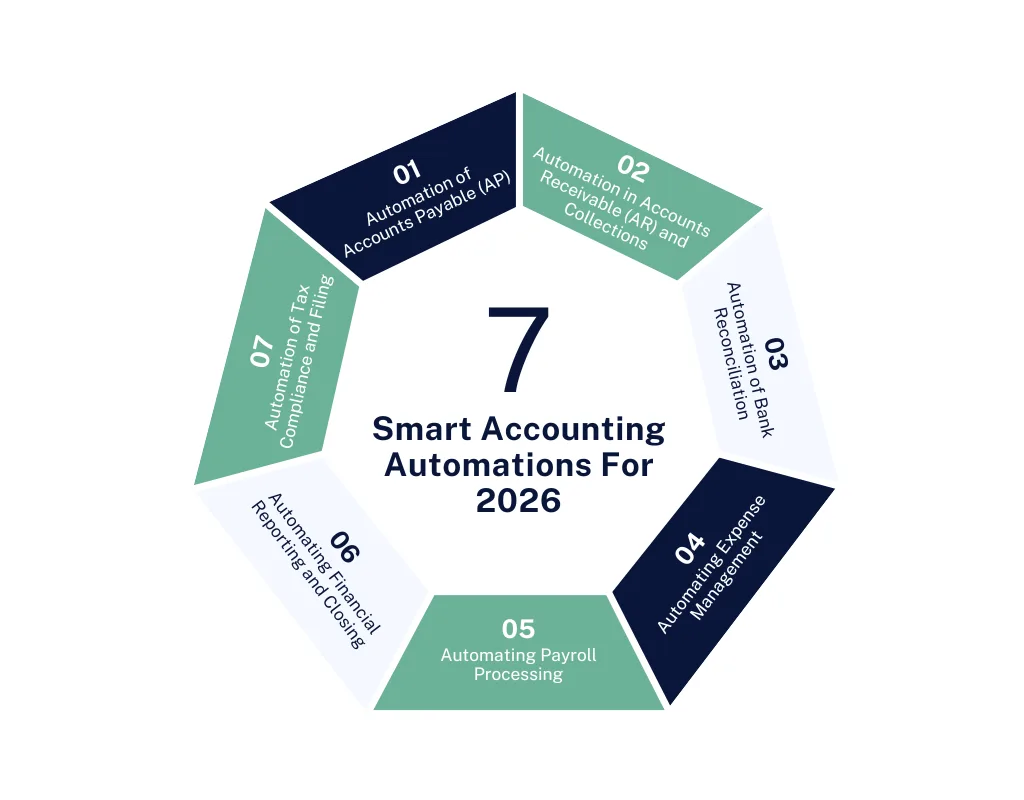
1. Automation of Accounts Payable (AP)
Automation saves accounts payable times spent on repetitive tasks. Automation in payables processing increases the following:
- Elimination of manual data entry
- Reduction of human errors
- Speed of approval of invoices
- Timeliness of vendor payments
With AI-based optical character recognition (OCR), invoices are scanned and coded (recorded) directly into the Accounting system. AP workflows that automate invoice matching and approval decrease bottleneck situations and improve the relationship with the vendor.
Faster processing, a decrease in the number of late fees, and increased trust in the vendor relationship improve the business.
2. Automation in Accounts Receivable (AR) and Collections
AR Automation includes assigning invoices digitally, sending reminders and follow-ups, tracking payments, and reconciling payments via an integrated system that allows online payments.
Generated payment reminders and overdue statements are sent automatically. Connection with ACH and credit card processing is available.
The business doing this has a sooner receipt of the sale (improved days’ sales outstanding) and increased cash availability.
3. Automation of Bank Reconciliation
Old-fashioned bank reconciliation is time-consuming and tedious. Bank Reconciliation saves a lot of time because it connects transactions directly to the financial accounts, eliminating the need for manual matching. Instruments available for reallocation:
- Matching of transactions in real time
- Flagging of discrepancies
- Updating transactions in real time
The result is a complete system for financial forecasting, auditing, and tax preparation with trustworthy and clean financial records.
The business reaps the benefits of prompt reconciliation and trustworthy financial records.
4. Automating Expense Management
Employees submit receipts through email, chat, or even physical papers. This causes missing receipts and slow reimbursement times. Expense Management Automation:
- Receipts can be managed through mobile apps.
- Expenses are organized and categorized using an AI.
- Expenses can be synced using a corporate credit card.
- Enforces policy compliance.
- Integrating payroll and reimbursements combines all services from capture to reimbursements.
Business Impact: Better adherence to company policy and an increase in the speed in which reimbursements are processed.
5. Automating Payroll Processing
The payroll process is time-sensitive. If mistakes are made, employees can become frustrated, and it can create a problem in meeting compliance. Payroll automation systems:
- Calculate wages, taxes, and withholdings.
- Keep track of time and PTO.
- Automatically creates and provides employees with a W-2 and/or 1099.
- Automatically tracks compliance for federal, state, and local taxes.
In an era of constantly changing tax requirements and classifications of employees (such as gig workers), it minimizes the problem by using automation.
Business Impact: Payroll is processed in a quicker time, and compliance errors are reduced.
6. Automating Financial Reporting and Closing
The process of closing a month or a quarter can take a long time. Tools can be used to help close the books:
- Closing lists can be standardized using automation.
- Auto-posting for recurring entries can be done.
- Data from various entities can be consolidated.
- Financial statements can be created in real-time.
Automated reporting provides the speed of the insights business leaders need in 2026 to make informed decisions.
Business impact: The closing process is quicker, and the organization has access to real-time visibility of their finances.
7. Automation of Tax Compliance and Filing
With every passing year, tax-related processes are getting increasingly complex. Automated tax tools do the following:
- Monitor tax obligations as they arise.
- Provide multi-jurisdiction compliance via rule-based engine methodology.
- Prepare tax-related forms automatically (i.e., 941, 1099, state sales tax).
- Integrate with bookkeeping solutions.
As such, they minimize penalties and optimize engagement with tax advisors.
Business impact: Lowered exposure to audits and greater assurance of compliance.
How to Prioritize Automation – A Strategic Framework
The act of automation is more than the acquisition of a computer program; it is more a matter of focusing on the more significant influences. Here is a method used by many prosperous companies on the market.
1. Keep Track of Your Existing Procedures
Record how each task is accomplished, who is involved, and what the hold-up is. The pattern of visual processes shows repetitive and manual processes that are ready for automation.
2. Impact vs. Effort Scoring
A simple matrix illustrates this best.
| Task | Manual Time | Error Risk | Revenue Impact |
High-impact, low-effort tasks (like invoice capture) should be automated first.
3. Business Aims
Not every automation is the same. Should the goal be for the company to grow quickly, then you will need to look for automation that allows the company to receive funds quickly. If the company is looking to reduce exposure, then automation of everything that concerns taxes and compliance is a must.
4. Develop Step-by-Step
Beginning with a small set of processes will ease the transition. The first few victories will be the most important and will allow you to have a solid “buy-in” from your leaders, release the processes to the rest of the users, and get them to adopt the system.
Top Tools & Technologies for 2026
Here is the list of the latest technologies impacting automation and accounting in 2026:
1. Artificial Intelligence and Machine Learning
AI can help forecast data, find anomalies, and extract data from invoices.
2. Robotic Process Automation – RPA
RPA bots can take care of posting invoices and doing reconciliations.
3. Cloud ERP & Accounting Platforms
Cloud systems such as the latest versions of QuickBooks, NetSuite, and Microsoft Dynamics create secure, centralized data and seamless integrations.
4. AP/AR Automation Tools
Bill.com and Tipalti help in automating and streamlining the entire AP and AR processes.
5. Expense & Payroll Apps
Apps such as Expensify, Gusto, and Deel provide automation for payroll as well as expenses.
6. Tax Automation Software
AI assistants and tax engines like Avalara or Vertex help in tax compliance across different jurisdictions.
Real-World Examples of Impact
To be more specific, think about these scenarios:
Example 1 – Mid-Size Retailer
Before automation: Manual invoice data entry took 20 hours/week.
After automation: AP automation decreased time spent on manual invoice data entry by 70% and decreased invoice data entry mistakes by 90%.
Example 2 – Tech Startup
Before automation: Receivables had 60-day-plus outstanding invoices.
After automation: AR automation and automated reminders decreased DSO by 25%.
Example 3 – Professional Services Firm
Before automation, manual updates for payroll tax led to errors.
After automation: Payroll automation led to no more compliance errors and even fewer disputes.
These stories are not rare. These are average events occurring to U.S. companies in 2026.
Common concerns – and the facts
Most businesses hold back from automation because of the following:
Concern 1: “It’s too expensive.”
Truth: With most automation tools, especially cloud-based SaaS (Software as a Service) tools, the ROI (Return on Investment) from time savings, reduced errors, and faster period closes offsets the subscription fees.
Concern 2: “We have data security concerns.”
Truth: Newer solutions are much more secure than using a manual spreadsheet. Modern solutions have enterprise-level encryption, role-based security access, and audit logs.
Concern 3: “Our team will resist the changes.”
Truth: Involvement, effective communication, and supportive training significantly improve the rate of adoption.
Concern 4: “Automation will eliminate jobs.”
Truth: Jobs are not eliminated through automation; roles are elevated. Instead of doing repetitive data entry, manual work, and clerical tasks, employees will be doing more higher-level work like analysis, strategy, and consulting.
Conclusion
Automation is required, particularly in 2026. By automating key accounting functions, such as accounts payable and tax compliance, businesses can improve their efficiency, reduce risk, and support strategic growth.
Regardless of size or sector, it’s time to embrace automation.
FAQs
1. What accounting tasks should be prioritized for automation in 2026?
The most valuable tasks for automation involve manual and repetitive work that is prone to errors. These most valuable tasks for automation are accounts payable, accounts receivable, Payroll Processing, tax compliance, expense management, contract management, financial reporting, and bank reconciliation.
2. What accounting processes should I automate first?
Begin by qualifying tasks that are high impact and high effort and, therefore, require automation. An accounting process that requires automation is one that takes a lot of time, is prone to repetitive errors, and affects cash flow significantly.
3. Is automation of accounting processes a good investment for small businesses in the USA?
Yes. Because of the various pricing structures of cloud-based accounting software, small businesses and startups will benefit the most. The time that will be saved and the mistakes that will be avoided will give a good ROI.
4. Will automation of accounting tasks lead to job losses in accounting and bookkeeping?
No. Accounting tasks are automated so that financial analysis, evaluation, and financial forecasting will have to be done. It gives Accountants and Bookkeeping staff a lot more work, so it will not lead to any job losses.
5. How secure is the automation of accounting and cloud-based accounting?
More modern automated accounting systems will be more secure than keeping Accounting records manually in spreadsheets. Most automation systems are secure and are more secure than the manual accounting systems because of advanced encryptions, POS, and secure cloud systems.
6. What is the timeframe for implementing automation for accounting?
The timeframe is relative to the level of intricacy of the business and of the model(s) being incorporated. Basic automation processes (e.g., bank feeds and invoice capture) can take days to set up; however, holistic ERP automation can take weeks and, in some extreme cases, months.
7. What is the ROI for automating accounting processes?
ROI is predominantly through decreased labor expenses, fewer compliance fines, and, as a result of these, faster financial closes and better overall control of the organization’s cash. Companies that have Automated Accounting Processes have seen improvements in efficiency of 50% to as much as 80%.